


Mobile Application VAPT: Why Security Testing Matters for iOS and Android Apps
Mobile business applications are widely adopted and remain essential assets across numerous industries. These applications enable users to pay bills and purchase goods and services, while some also provide access to health and wellness solutions. They also help businesses securely store, manage, and maintain their data.
Given the sensitive nature of the data mobile applications process, a secure mobile application is vital. A mobile application may appear secure to users, yet it may still contain major security flaws and vulnerabilities. Unauthorized persons may gain access to secure data, initiating vulnerable actions that can imply the threat of data breaches and security. Similarly, mobile application flaws may directly impact the availability and integrity of business data.
It is prudent for businesses to evaluate the security of their mobile applications. The Mobile Application Vulnerability Assessment and Penetration Testing (VAPT) process achieves this objective. The VAPT process helps businesses identify the various mobile application security flaws and potential exploits.
In the United States, this service is most commonly referred to as mobile application penetration testing or mobile app penetration testing; this guide uses both terms.
In brief, mobile application VAPT is a structured security assessment of an iOS or Android application, its locally stored data, its network traffic, and its backend APIs. It identifies vulnerabilities, safely exploits them to demonstrate their impact, and provides a prioritized report with remediation recommendations and retesting.
What is Mobile Application Security?
Securing a mobile application involves protecting data and ensuring secure communication between the application and its back-end services. Security measures must continue after the application is released and as it is updated.
Mobile application security is a complement to traditional (operating system and mobile hardware) security. For example, A mobile application, such as a banking app, must safeguard users’ login credentials and account access rights, as well as ensure the security of payment transactions. Protecting users’ data is essential and helps mitigate liability arising from data exposure.
What is Mobile Application VAPT?
A Mobile Application VAPT comprises a vulnerability assessment and a penetration test. A vulnerability assessment is an analysis of a mobile application that identifies security flaws and defects.By contrast, a penetration test attempts to exploit those weaknesses, with authorization, to measure the real impact of an attack. Mobile application code, session management, authentication, and network and application interaction are some elements of a mobile application that are assessed during a penetration test.
Why Mobile Application Security Testing Matters Today
The mobile security testing tends to provide a systematic approach towards the mobile based apps services. When dealing with business-critical tasks, personal data, and financial information, the stakes are high. A compromised or badly secured mobile app can leak customer data, compromise accounts and business operations, and become a new vector for cyberattacks.
Mobile Application Security Testing can identify problems within the application code, data storage, authentication, APIs, and communication channels as the mobile threat landscape evolves, making attacks increasingly difficult to defend against.
Why the Risk Is Higher Than Ever
Mobile applications often run in environments that businesses do not fully control. Users may connect to public Wi-Fi, or install apps on devices with different security settings, including rooted or jailbroken devices. In these scenarios, attackers can inspect mobile packages, audit network traffic, and manipulate app behavior.
Why Mobile App Security Is Critical for Businesses
From the perspective of a mobile application’s code, a session token serves as a mechanism for protecting access to a user’s account. However, if the token is stored or transmitted insecurely, an attacker may gain access to the account. Validating transactions and access rights is essential for mobile payment applications to prevent unauthorized transactions, and it is just as important in any business-critical app.
Mobile apps can put businesses at risk in multiple ways:
Customer trust: Customers are less likely to trust and use apps that put their financial or personal information at risk.
Revenue: Negative security events such as Payment fraud, service disruption, or application downtime can put customers off using a business.
Regulatory or Legal Requirements: Business apps that store bank or medical information can put a business at legal and ethical risk if information is stolen or leaked.
Business reputation: Negative security events damage the reputation of a business and put off potential clients.
Customer Security Requirements: Significant clients and business partners may not allow access to their apps if the business cannot provide security testing documents.
Mobile applications can present a range of security risks to businesses. Security testing enables businesses to better understand and manage these risks.
How Mobile App Testing Differs from Web Testing
Web and mobile applications may share a back end, but they often have different user interfaces, front ends, and attack surfaces. When testing web apps, focus on session management, authentication and authorization, server-side logic, and access control.
In mobile app testing, attention is focused on local storage, application permissions, device-level protection, and interactions with other apps. Mobile applications are also vulnerable to attacks that manipulate their packages and code.
A mobile application may expose customer data to risks that a web application does not. It may store customer data in files, logs, or databases.
Both types of testing need to assess elements like authentication, authorization, application logic, and communication with the application backend. APIs used by multiple applications need to be part of the threat model during testing.
Read more about Web, API and Mobile App Penetration Testing to understand how these assessments differ.
Key Security Threats in Mobile Applications
Mobile applications pose different security risks and challenges. These risks differ depending on where they are located in the application. Some of the common risks are:
Insecure storage of sensitive data: Usernames, passwords, and other sensitive information may be stored without protection.
Inadequate authentication controls: Poor authentication and session management controls may allow unauthorized access to protected resources.
Insecure data transfer: Sensitive information may be transmitted to or from the server without protection.
Use of hardcoded Credentials: Secrets embedded in application code can be discovered through reverse engineering.
Improper access controls: Users may be granted access to other users' data or other protected functions of the application.
Other risks include insufficient protection of components, insecure communication between components, and inadequate input validation. The consequences of an attack depend on the application and the data it handles. For example, an attack on a banking application may expose other customers’ account details, while an attack on a healthcare application may expose patient records.
How VAPT Works in Mobile Application Security
A mobile application VAPT tends to follow with classified approach. The scope and testing methodology depend on application architecture, business risk and testing.
A mobile application vulnerability assessment will typically consist of the following:
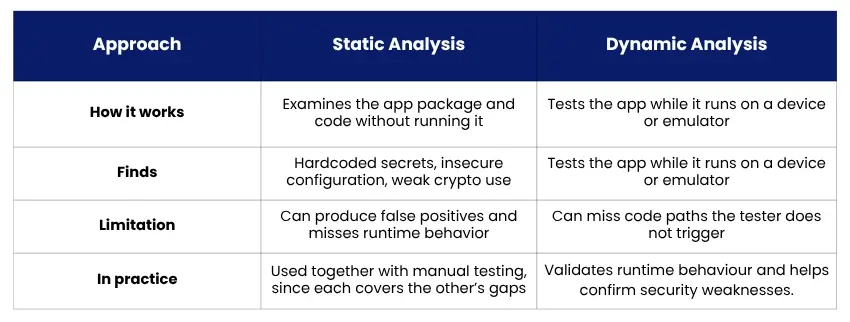
- Application package and configuration review.
- Static analysis of application code, where available.
- Dynamic testing while the app is running.
- Local data storage and encryption checks.
- Authentication, authorization, and session management.
- Network communication and certificate validation.
- API and Backend security testing, if included in scope.
- Business logic and access-control testing.
The mobile application vulnerability assessment will also test the security of the application's backend, API, and business logic.
What a Typical Assessment Includes
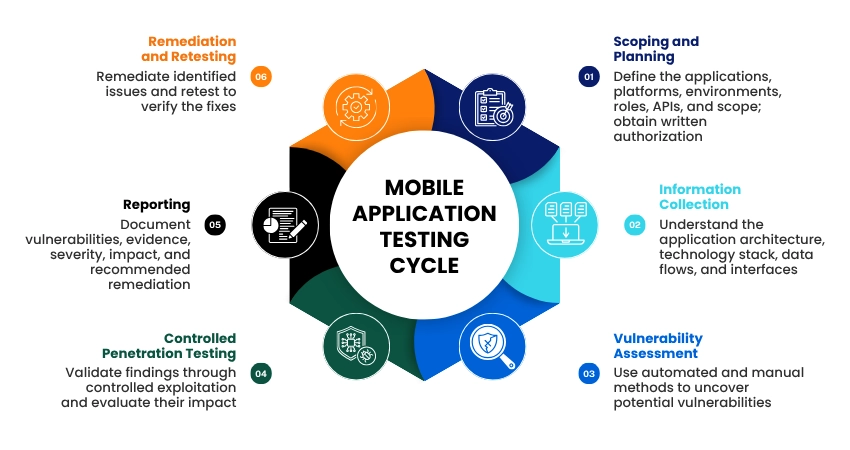
1. Scoping and planning: Define the applications, platforms, environments, user roles, APIs and testing scope. Gain authorizations and rules of engagement in writing.
2. Information collection: Know the app architecture, the technology stack, data flows, and the interfaces that it exposes.
3. Vulnerability assessment: Employ suitable automated and manual methods to uncover possible mobile application vulnerabilities.
4. Controlled penetration testing: Confirm cross-referenced findings and evaluate their impact.
5. Reporting: Record the vulnerabilities and evidence, severity, impact, and suggested resolution.
6. Remediation and retesting: This is when your development or security team takes care of the found issues. After remediation, the issues can be retested. Need a mobile app penetration test scoped for your iOS or Android app? Talk to Intercert’s security team.
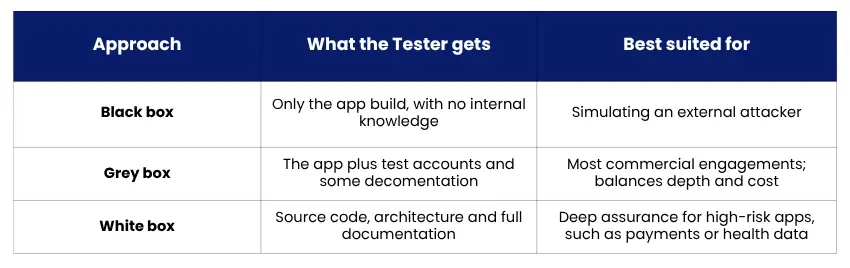
Black-box, White-box, and Grey-box Testing
The testing approach determines how much the tester knows in advance and how thoroughly they can test.
Static vs Dynamic Analysis
Typical Testing Instruments
- MobSF: a tool for automated static/dynamic analysis.
- Frida: runtime instrumentation for your app or operating system.
- Burp Suite: intercepting proxy, used to analyze app-to-server.
- Drozer: examines the Android attack surface, like exported components.
- JADX and Ghidra: decompilation and reverse engineering of app code.
Tools support the work but do not replace manual testing, particularly when evaluating business logic and authorization flaws.
Mobile App Security Testing for iOS and Android: What Differs
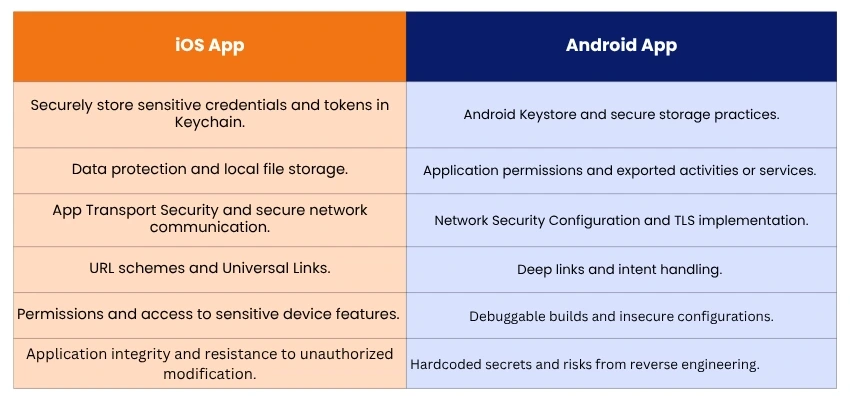
The iOS and Android applications may provide similar features, but their operating systems, security models, and development environments differ. When mobile application security testing focuses on iOS/Andriod applications, the assessment may include the following items:
Testing iOS Applications
iOS application security testing examines how an app uses Apple's security capabilities and protects information on the device. We may review:
- Securely storing sensitive credentials and tokens in Keychain.
- Data protection and local file storage.
- App Transport Security and secure network communication.
- URL schemes and Universal Links.
- Permissions and access to sensitive device features.
- Application integrity and resistance to unauthorized modification.
For example, if an iOS application stores a token in an inadequately protected file, a compromise of the host or application environment could expose the associated account.
Testing Android Applications
Android application security testing reviews sandboxing, permissions, exported components, and inter-app communication. Review items may include:
- Android Keystore and secure storage practices.
- Application permissions and exported activities or services.
- Network Security Configuration and TLS implementation.
- Deep links and intent handling.
- Debuggable builds and insecure configurations.
- Hardcoded secrets and risks from reverse engineering.
For example, an app may expose a component that another app can invoke, despite lacking permission to access it.
The testing method should reflect the app’s actual architecture, supported operating-system versions, and appropriate device configurations.
OWASP MASVS Control Areas
The OWASP Mobile Application Security Verification Standard (MASVS) establishes a recognized baseline for assessing mobile application security. It defines 8 overarching control areas that further specify mobile app security. These areas include:
- Storage: Security of information stored on devices.
- Cryptography: Use of cryptographic functions and mechanisms.
- Authentication: Apps’ mechanisms to validate users.
- Network: Security of information transmitted over networks.
- Platform: Apps’ mechanisms to communicate securely with other apps and the OS.
- Code: Secure coding mechanisms.
- Resilience: Protection of mobile apps from unauthorized changes.
- Privacy: Mobile apps’ mechanisms to protect users’ information and respect users’ privacy.
OWASP Mobile Application Security Testing Guide (MASTG) is one of OWASP’s flagship resources used to guide testers in evaluating mobile application security controls.
Backend and API Security Testing: Do Not Overlook It
A mobile application relies on many behind-the-scenes components, including application programming interfaces (APIs), user databases, authentication systems, electronic payment services, and cloud components.
Even if the components of a mobile application are secure, an insecure API could still allow a malicious user to access protected data.
For example, a mobile application may communicate with an API to retrieve user account data. If the API does not implement proper authorization to restrict access to a user’s account data, it may allow a malicious user to access another user’s account data.
To ensure the security of the communication between a mobile application and a server, the security of the Application Programming Interfaces (APIs) and other supporting elements should be tested, in addition to testing the security of the mobile application.
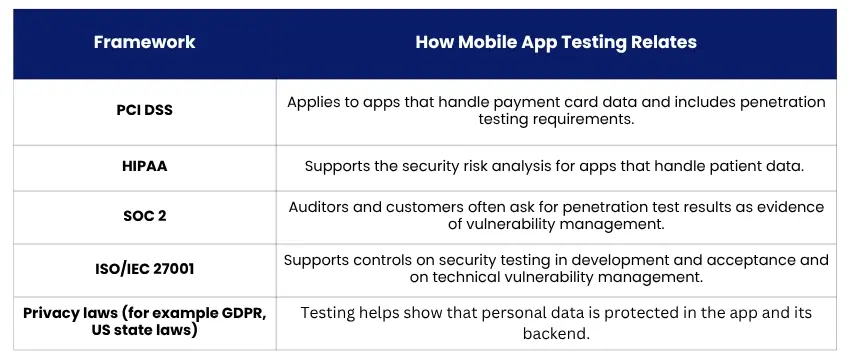
Compliance: When Mobile Testing Is Expected
Some frameworks require or strongly recommend regular security testing of applications that handle this type of information. This includes mobile applications that store, manage, or disclose such data.
Benefits of VAPT for Mobile App Security
A structured Vulnerability Assessment and Penetration Testing of mobile applications can help achieve the following:
- Accomplish mobile application vulnerability assessment and determine threat potential.
- Assess the potential effect of vulnerabilities on customers and mobile application business operations.
- Evaluate the efficacy of controls that protect mobile application data.
- Determine mobile application trust and assess the security of integrated/third party applications.
- Support organization security and compliance activities.
- Prioritize corrective action based on potential impact and threat level.
- Aid in mobile application security assessment and adapt to changing requirements.
VAPT enables the identification of security flaws in an application; however, complete security of an application can never be ensured by performing VAPT. VAPT provides a snapshot of application security flaws in the current state, within the limitations of the scope and conditions under which it is performed.
How Security Assessments Build Digital Trust
Customers expect their data to remain secure, even when they are unable to inspect the security controls implemented in a software application. Past incidents have demonstrated that a single security breach can significantly undermine trust in a business.Businesses can build a similar level of trust in their applications through independent verification that their controls are effective. This verification can also support customer and vendor assessments, acquisitions, sales, and internal due diligence.
Ways Assessments Strengthen Customer and Stakeholder Confidence
Assuring security: Regular assessments of application security demonstrate that business risk is being managed.Achieving compliance: Security and privacy requirements can be managed by addressing the outcomes of security assessments.Managing risk: Provides feedback to risk owners on the management of business risks. Supporting business: Customers and business partners assess and evaluate service providers based on security assessments.Security should be an ongoing process, integrated into product development. To ensure and avoid threats and vulnerabilities, VAPT should be conducted at multiple stages throughout a product’s lifecycle.
Integrating VAPT into the App Development Lifecycle
Mobile app security is not a one-time test conducted before launch. It should be integrated into the design, development, testing, and ongoing maintenance processes.Consider conducting testing at release time, following substantial refactoring, when introducing new payment or authentication capabilities, or when high-risk vulnerabilities are identified in application dependencies.Automated tests can enhance continuous testing; however, regular manual testing remains necessary to identify complex business logic issues and authorization failures.
How to Prepare for a Mobile Application Security Test
To conduct a mobile application security test, clients are typically expected to provide the following:
- Application builds: Both iOS and Android application builds (i.e., IPA and APK files, respectively) in the format they are to be tested.
- Test scope: A description of the application versions, environments, and components to be tested.
- Test accounts: Accounts of all types (i.e., administrative and user accounts) to be tested.
- Architecture: Documentation describing data flows and integration with third-party applications and services.
- Authorization: Written approval to perform the assessment.
- Testing policy: Understand the assessment’s limits (e.g., test windows), safeguards (e.g., no production access), and whom to contact in an emergency.
Conclusion
Mobile apps are critical to your business. As reliance on them grows, so does the need for security to protect the content and services they provide to end users. Mobile application VAPT helps identify and assess vulnerabilities in iOS and Android applications, while evaluating the risks associated with their various components and services.The ideal solution includes testing mobile applications in accordance with organizational policies and procedures; conducting a specialized and comprehensive evaluation; assessing the application’s backend and API integrations; and engaging the development team to prioritize and resolve identified issues.
INTERCERT provides Vulnerability Assessment and Penetration Testing (VAPT) services to help organizations evaluate application and technology security. A well-scoped assessment can give your teams clearer visibility into vulnerabilities and practical priorities for strengthening application security.
Want to understand the security gaps in your mobile application? Explore INTERCERT's VAPT services.


 +1 (281) 720-3261
 info@intercert.com
 2001 Timberloch Place - Suite 500, The Woodlands, Texas 77380, United States